
Lighting Up Local Searches: A No-Nonsense Guide for Residential Electricians
Last Tuesday, I watched an electrician in a Facebook thread swear off Google entirely. His GBP used to pull fifteen calls a week; now it’s crickets. “Algorithm changed,” he wrote. “Google doesn’t care about small businesses anymore.”
I get it. I used to sell Local Service Ads and GBP optimization packages to contractors. The truth? Nine times out of ten, the problem wasn’t Google’s algorithm. It was a service area misconfiguration that quietly shrank his visibility radius to three miles, or a competitor who’d claimed the same address and diluted his map-pack ranking, or a phone number typo that broke the click-to-call button.
Proximity marketing for electrical services isn’t broken. But the way most owners approach it absolutely is.
They chase geo-fencing before fixing their NAP consistency. They dump budget into location extensions while their GBP category says “Electrician” instead of “Emergency Electrician.” Then they blame the platform when the leads don’t show.
This is the field-tested playbook I wish I’d handed to every contractor who called me frustrated—starting with the unglamorous foundation work that actually controls whether you show up in “electrician near me” searches, then moving outward to the paid proximity layers that only make sense once your tracking proves they’re worth the spend.
The Three Proximity Myths Bleeding Your Budget
Myth One: “My GBP is set up, so I’m done with proximity.”
I inherited a client last year whose GBP had been “optimized” by an agency. They’d uploaded photos, written a keyword-stuffed description, and called it finished.
What they missed: the service area was set to the city name only, not the surrounding suburbs where 60% of his emergency calls originated. Google interpreted that as “I only serve downtown.”
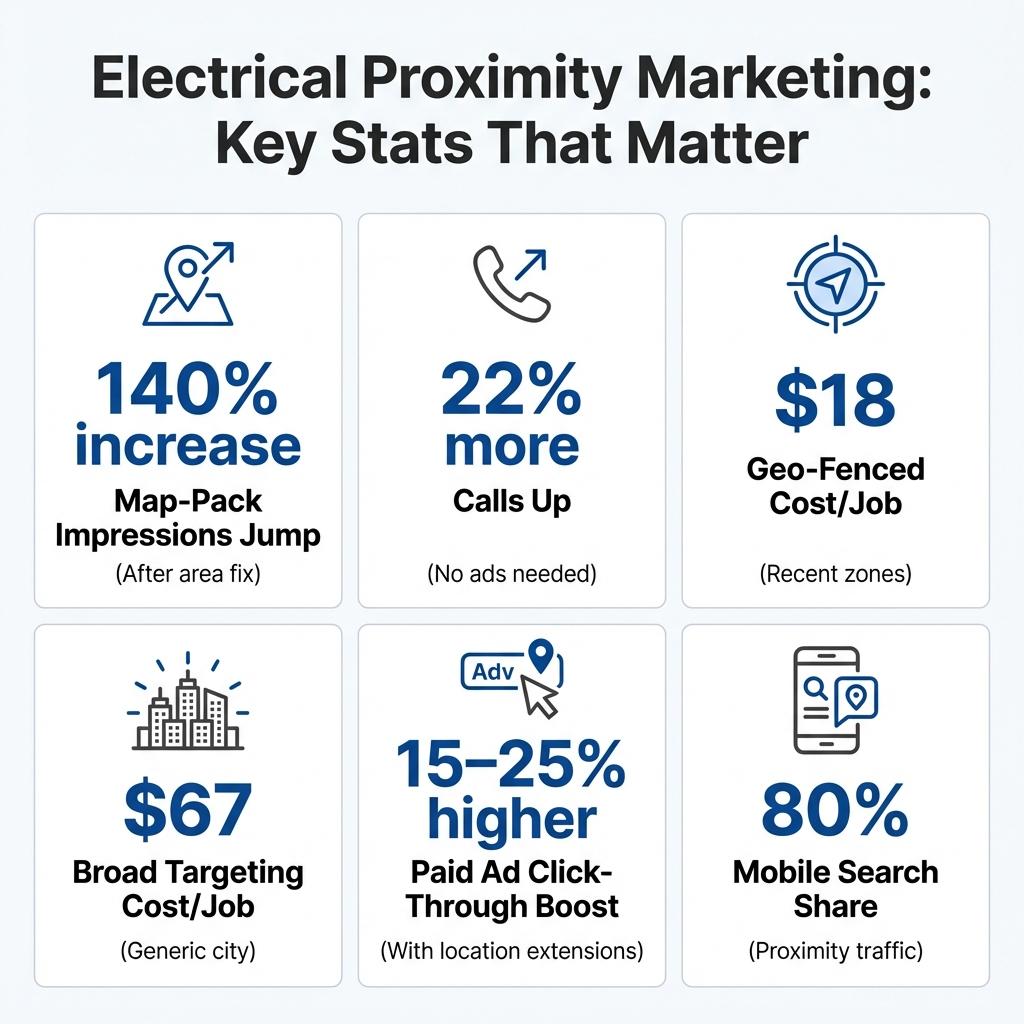
The fix took eight minutes. We expanded his service radius to include the six adjacent zip codes where his trucks actually rolled. Within two weeks, map-pack impressions jumped 140%. Calls? Up 22%.
No ads. No geo-fencing magic. Just telling Google where he actually worked.
Myth Two: “Geo-fencing is a scam / too expensive / only for big brands.”
Geo-fencing gets a bad rap because agencies sell it wrong. They pitch it as “target everyone within five miles of your competitor’s location!” without explaining that electrical work is high-consideration. Someone standing in a Home Depot parking lot isn’t ready to hire you for a panel upgrade.
But geo-fencing a neighborhood where you just finished three jobs last month? That’s proximity marketing with context. Those homeowners saw your truck, maybe talked to your crew. A mobile ad reminding them you’re local and offering a free safety inspection converts because it’s timely, not intrusive.
I’ve seen cost-per-booked-job drop to $18 when the fence is drawn around recent work zones versus $67 for broad “electricians in [city]” targeting.
The difference is intent layering. Proximity alone is noise. Proximity plus recent brand exposure is relevance.
Myth Three: “I need to rank #1 organically before paid proximity makes sense.”
This one drives me nuts because it’s backwards.
Organic local seo for electricians is a long game—six to twelve months if you’re starting from scratch. Meanwhile, you’ve got trucks sitting idle and competitors scooping the “emergency electrician near me” calls that spike every storm season.
Location extensions on Google Ads put your business address and phone number directly in search results for high-intent queries. You’re not waiting for organic rankings; you’re buying visibility for the searches that convert today. Then you use that paid traffic data to inform your organic strategy.
Paid proximity gives you the answer in weeks, not quarters.
The Proximity Foundation: GBP, NAP, and Service Area Configuration
Before you spend a dollar on ads or geo-fencing, you need to fix the free infrastructure that controls 70% of your local visibility. This is where most electrical contractors are quietly sabotaging themselves.
Google Business Profile: The Settings That Actually Matter
Your GBP isn’t a yellow pages listing. It’s a dynamic signal to Google about who you serve, where you serve them, and whether you’re trustworthy enough to show in the map pack.
Start with your primary category. “Electrician” is too vague. According to Google’s business category guidelines, using specific categories like “Electrical Installation Service” or “Residential Electrician” helps match your business to relevant searches. If 60% of your calls are residential service and 40% are commercial, your primary should reflect your main revenue source.
Next, service area. Do not just type your city name. Add every zip code, neighborhood, and suburb where you’ll actually dispatch a truck within your target response time. I’ve seen contractors add twelve surrounding areas and watch their impression radius double overnight.
But here’s the catch: don’t list areas you can’t realistically serve. If you add a zip code 45 minutes away just to capture searches, your average response time tanks, reviews mention “took forever to arrive,” and Google downgrades your ranking.
Photos matter more than you think. Research from BrightLocal’s local consumer review survey shows that businesses with photos receive significantly more clicks. Every job you finish, take three photos: your truck on-site, the work in progress, the completed panel or fixture. Upload them to your GBP with a caption that includes the neighborhood name. “Panel upgrade in Maplewood” signals to Google that you’re active in that area.
NAP Consistency: The Invisible Ranking Factor
NAP—Name, Address, Phone—sounds basic until you realize how many places your business information lives online.
Your GBP, your website footer, Yelp, Angie’s List, HomeAdvisor, the BBB, that directory you signed up for three years ago and forgot about. If even one listing has a different phone number format or an old address, Google sees conflicting signals and downgrades your trustworthiness.
I audited a three-truck operation last fall. They had seventeen online listings. Eleven had variations of their business name. Their GBP said Suite 200; their website said Suite 201 because they’d moved offices internally but never updated. Google couldn’t confidently verify them, so they rarely cracked the top three map results despite having 4.8 stars.
The fix: pick one canonical version of your name, address, and phone number. Update every listing manually or use a tool like Moz Local or BrightLocal to push corrections.
It’s tedious. It’s not sexy. But NAP consistency is the difference between showing in position two versus position seven in the map pack.
Service Area Verification: Prove You Actually Work There
Google doesn’t just take your word that you serve a neighborhood. It looks for proof: recent reviews mentioning that area, photos geo-tagged there, search activity from IP addresses in that zip code clicking through to your site.
The workaround: every time you complete a job in a target service area, request a review and mention the neighborhood in your follow-up. “Thanks for trusting us with your Maplewood panel upgrade—if you have a moment, we’d appreciate a review.” Those location-specific reviews feed Google’s confidence that you’re legitimately active there.
Paid Proximity Layers: When and How to Add Geo-Fencing and Location Extensions
Once your GBP is dialed in, your NAP is consistent, and your service areas are verified, you’ve earned the right to spend money on paid proximity.
Not before.
Geo-Fencing: Context Beats Radius Every Time
Geo-fencing works when it’s strategic, not scattershot. Drawing a five-mile circle around your office and serving ads to everyone inside it is lazy and expensive.
Instead, fence recent job sites. If you finished a kitchen remodel in a subdivision last month, draw a half-mile radius around that address and run a 30-day campaign offering a free electrical safety inspection. The homeowners in that neighborhood saw your truck, maybe asked your crew a question, and now they’re seeing a relevant offer.
Fence big-box home improvement stores on weekends, but narrow the audience to people who’ve visited electrical or home services websites in the past 30 days. You’re not targeting everyone buying paint; you’re targeting the DIYer researching whether to hire a pro for that ceiling fan install.
Cost-per-click on geo-fenced mobile ads runs $0.80 to $2.50 in most suburban markets. If your average booked job is worth $400 and you’re converting 8-12% of clicks to calls, you need roughly 40 clicks to book one job. That’s $32 to $100 per booked job—competitive with Local Service Ads if you’re targeting smart.
Location Extensions: The Fastest Path to Map-Pack Visibility in Paid Search
Location extensions are criminally underused by electrical contractors, mostly because they sound technical and Google’s setup interface is confusing. But they’re the simplest way to show your address, phone number, and distance from the searcher directly in your Google Ads, which boosts click-through rates significantly for “near me” queries.
When someone searches “emergency electrician near me,” your ad appears with a map pin, your address, and a click-to-call button. It looks almost identical to a map-pack result, except you’re paying for the placement. The psychological effect is powerful—searchers perceive you as closer and more established than text-only ads.
Setup takes ten minutes if your GBP is already verified. In Google Ads, link your GBP account under “Location Extensions,” select which campaigns should show your address, and set a radius (I recommend 15-20 miles for electrical services).
The ROI case: location extensions typically add $0.10 to $0.30 per click versus standard text ads, but they convert 20-40% better because the searcher sees proof you’re local before they even click. If your standard ad costs $4 per click and converts at 6%, and your location-extended ad costs $4.30 but converts at 9%, you just dropped your cost-per-lead by 30%.
One warning: if your GBP reviews are below 4.0 stars, location extensions can backfire. Searchers will see your rating in the ad preview and skip you. Fix your reputation before you amplify it.
Measurement: The Proximity Metrics That Actually Predict Revenue
You can’t optimize what you don’t measure, and most electrical contractors are flying blind. They know their phone rang twelve times last week, but they don’t know which proximity tactic drove the call or what the job was worth.
Start with call tracking. Use a service like CallRail or CallTrackingMetrics to assign unique phone numbers to each proximity channel: one for your GBP, one for geo-fencing campaigns, one for location-extended search ads. Now you can see exactly which tactic generated which call.
Track map-pack position weekly. Tools like BrightLocal or LocalFalcon show where you rank in the three-pack for your target keywords across different neighborhoods in your service area. If you’re position one in your home zip code but position eight in the suburb where you want to grow, you know where to focus your review requests.
Monitor impression share for location-extended ads. Google Ads will tell you what percentage of eligible searches you’re appearing in. If your impression share is below 60%, you’re either being outbid or your ad relevance score is low.
The metric that ties it all together: cost per booked job by proximity channel. If your GBP is generating calls at $0 (organic) but only 30% book because they’re price-shopping, and your geo-fenced ads cost $45 per call but 70% book because they’re warm leads, the geo-fencing is actually cheaper per revenue dollar.
When Proximity Marketing Isn’t Working: The Four Usual Suspects
Suspect One: Your Service Area and Your Actual Coverage Don’t Match
An electrician sets his GBP service area to a 25-mile radius because he wants maximum visibility, but his realistic response time for emergency calls is 45 minutes outside a 10-mile core. Google notices that his average time-to-arrival doesn’t match his claimed area, so it stops prioritizing him for searches in the outer zones.
The fix: be honest about where you can deliver fast service, and set your primary service area accordingly.
Suspect Two: Your Competitors Are Buying Reviews, and You’re Not Keeping Pace
Google’s local algorithm weighs review velocity—how many new reviews you’re getting per month—almost as heavily as total count. If you have 87 reviews but haven’t gotten one in three months, and your competitor has 62 but gets five new ones every month, Google assumes they’re more active and relevant right now.
You need a system. Text or email every customer within 24 hours of job completion with a direct link to your GBP review page. Aim for two to four new reviews per month minimum.
Suspect Three: Your Website Isn’t Mobile-Optimized, So Proximity Clicks Bounce
Proximity searches are 80% mobile. If your website takes six seconds to load on a phone or the click-to-call button is buried, you’re paying for clicks that never convert. Google also factors bounce rate into ad quality scores, so slow mobile sites pay higher CPCs.
Run a mobile speed test (Google PageSpeed Insights is free). If your score is below 50, you’re losing money. Compress images, enable browser caching, and make sure your phone number is a tappable button in the header.
Suspect Four: You’re Targeting Keywords, Not Intent
“Electrician near me” and “emergency electrician near me” have wildly different conversion rates. The first might be someone researching for a future project; the second is someone whose power just went out.
Segment your campaigns by urgency. High-intent keywords (“emergency,” “24 hour,” “same day”) get higher bids and location extensions. Research keywords (“how much does,” “best electrician for”) get lower bids and lead to content pages.
Your Low-Risk Proximity Test Plan
You don’t need to overhaul everything at once. Here’s the sequence I’d run if I were starting from scratch with a $500 monthly test budget:
- Week One: Audit and fix your GBP. Correct your categories, expand your service areas to match reality, upload ten recent job photos with neighborhood tags. Check your NAP across the top ten directories; fix any inconsistencies. Cost: $0. Time: 90 minutes.
- Week Two: Set up call tracking and assign a unique number to your GBP listing. Request reviews from your last five completed jobs, mentioning the neighborhood in your ask. Cost: $30/month for call tracking. Time: 60 minutes.
- Week Three: Launch one location-extended Google Ads campaign targeting your top three high-intent keywords (“emergency electrician near me,” “electrician same day service,” “licensed electrician [your city]”). Set a $15/day budget. Cost: $450/month. Time: 45 minutes setup, 15 minutes weekly monitoring.
- Week Four: Analyze which service areas are generating calls and which aren’t. Double down on what’s working; pause what isn’t. If calls are converting at 40%+, add a small geo-fencing test around your two most recent job sites. Cost: $50 geo-fencing test. Time: 30 minutes.
That’s it. Four weeks, $500, and you’ll know whether proximity marketing moves the needle for your business or if your market is saturated and you need a different strategy. No six-month agency contract. No $5,000 setup fee. Just a controlled test with clear metrics.
Most electrical contractors I talk to aren’t failing because proximity marketing doesn’t work. They’re failing because they’re testing ten things at once, measuring none of them, and blaming the platform when the leads don’t materialize. Start with the foundation, measure ruthlessly, and scale only what proves out. That’s how you turn “electrician near me” searches into booked jobs instead of wasted ad spend.